Some of my category pages have the home page duplicated at the bottom as seen here:
I’m concerned it may affect search results but I can’t find where I can remove the code
Some of my category pages have the home page duplicated at the bottom as seen here:
I’m concerned it may affect search results but I can’t find where I can remove the code
What do you see on the Website → Themes → Layouts → Categories page?
When I go there I have theme Editor but it doesn’t have a Layouts or extension to Categories just General, Logos, Colors, Fonts, Backgrounds and a blank Custom CSS. No other options!
What recent changes have been done?
Nothing of any real meaning other than cart update and some meta changes.
What CS-Cart version do you use?
4.3.9 as installed back in 2016. Not sure how we can improve on it and keep our present theme and its modifications
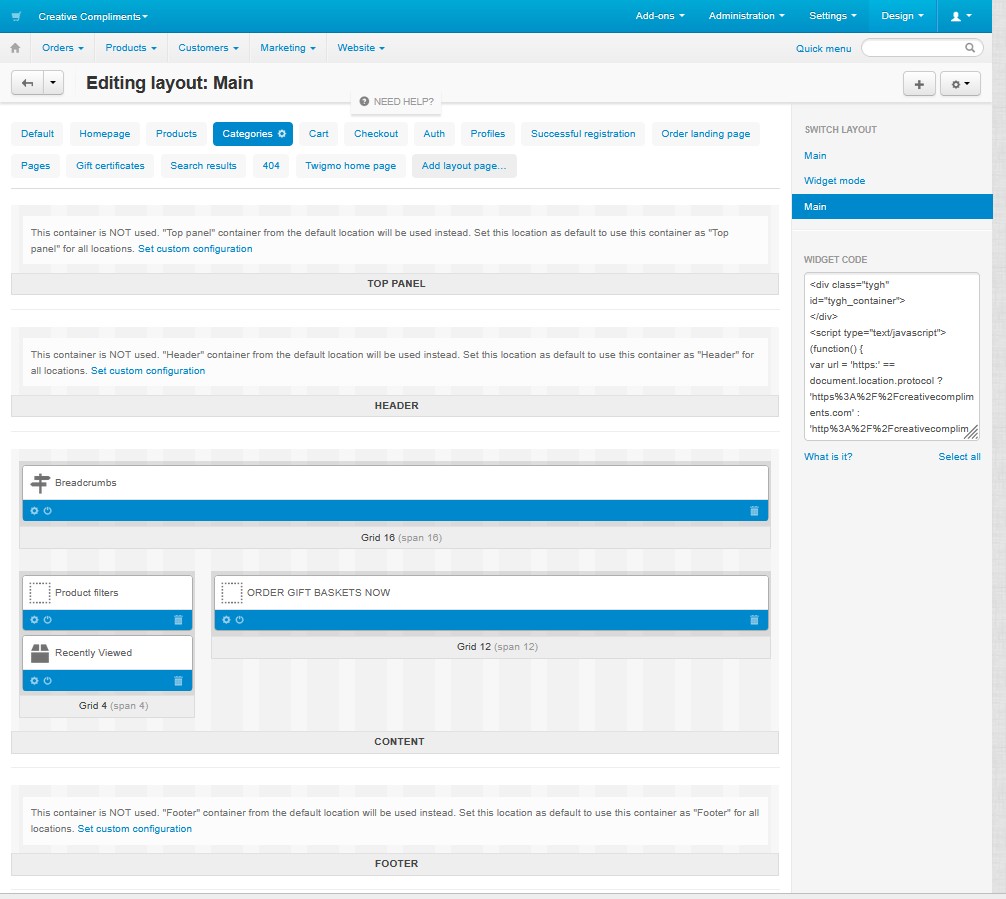
In this case check the Design → Layouts → Categories layout page
There doesn’t appear to be a “Layouts” page at Design → Layouts → Categories. There is of course the layouts page in Design but not in the categories. I’d send you a pic but there’s no provision to do so here in the Forum communications that I can see.
On the Categories layout page try to disable all blocks except the Main content one
Use the up arrow to upload a file.
There doesn’t appear to be a “Layouts” page at Design → Layouts → Categories. There is of course the layouts page in Design but not in the categories. I’d send you a pic but there’s no provision to do so here in the Forum communications that I can see.
Blocks look ok. It is required to examine issue directly on your server.