Hello folks,
I am using Ultimate and it runs 3 sites.
Has anyone met an issue like mine?
The catalog mode, once activated, affects all three sites. My question is, can I only set this mode to one site?
My situation is now, I activate the addon under a site, but it covers all sites.
Hello, by default each addon works on all sites.
We have solution Addon from RetailFactory.ru: Manage addons on storefronts
Please send me message if you like to check this addon
1 Like
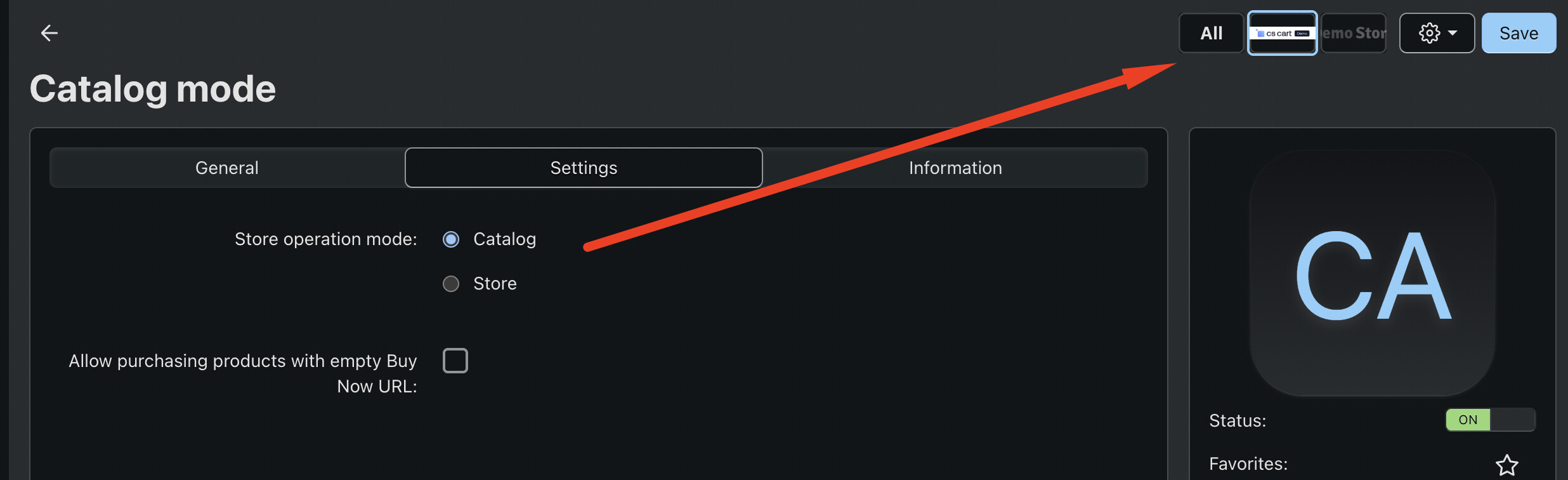
You can set different operation mode per store-front. For example, set Store mode for the store-front A and Catalog mode for the store-front B. Just go to the addon settings and use store-front selector at the top
2 Likes
For the Catalog mode addon, you will need to change store on the top first in order to change the setup “Store operation mode” for each store.
1 Like
Hi thank you very much for your guide. Check my steps.
- Go go the ADDON, find the Catalog mode addon, click it
- Under the ADDON, click the ’ Setting’ tag, choose “Store”
Store operation mode:
Catalog
Store - Click “save”
Check my operation here,
Thank you, my friend. I really appreciate that. 
Thank you for your recommendation. Well done.
I have another question: how to choose which store?
My action
Go to the ADDON, and choose the store.
There is no place to choose the store that needs to run Catalog mode. Then I tried to disable the Addon under a store section, but I found the Addon is disabled for all the sites.
My simple question is, after I have done the setting on the Addon, how do I keep it in Catalog mode?
Thank you
When you choose a store, the setting will be saved for that store. Do not disable the addon because addon status is global. Switch store to see the “Store operation mode” value.
1 Like
I think it’s more precise to say that you choose a site (Storefront) first on the top right. Choose the Store value of “Store operation mode” setting means this site will not run under Catalog mode.
1 Like
If I understand correctly, when the Addon is activated.
The store chooses Catalog, will run Catalog,
The store chooses Store, the link will has price and other things normally like the online store.
Yes and you just need to do below “Switch Between Storefronts” step first before saving the addon setup:
1 Like
Thank you indeed for the time on working my issue, my friend. God bless you!
I just wanted to reach out and say a huge thank you for your help!
I really appreciate the time you took to walk me through the solution step-by-step. Your instructions were incredibly clear and easy to follow, and thanks to your guidance, I’ve successfully resolved the issue.
It’s rare to find someone so patient and willing to help. Thanks again for your kindness!
1 Like
This topic was automatically closed 12 hours after the last reply. New replies are no longer allowed.