New UPS and USPS Integrations v4.18.2+

Does anyone have the new integrations from UPS and USPS working properly.

UPS was updated on v4.18.2 - I have it working but I can’t get my negotiated rates to show and I am positive I have I have the settings correct.

USPS was updated on v4.19.1 - I have my settings correct or at least I believe I do. I can’t get any rates in admin test calculation or on the site.

I have contacted CSC support and I am not getting anywhere. Don’t want to pay for upgraded support when it seems like this is their issue to resolve.

I have contacted UPS tech and everything they tell me points to CSC integration issue.

I have not contacted USPS support.

Anyhow, let me know if any of you have these working properly and if you had to do something special to get them to work properly.

Thanks
Ken

Where did you find instructions for setting up real-time shipping rates in the new version 4.19.1? I am not seeing anything in the documentation about how to do this. When I upgraded my store I was sent an automated email that said I need to acquire API credentials at the USPS web site, but gave ZERO instructions on how to do this. How did you accomplish this?
Sorry I’m not answering your question, but if I can figure out how to get the API credentials, maybe we can troubleshoot this together.

UPDATE: I managed to get everything set up with USPS, input my client ID and secret ID into the CS-Cart shipping settings for Priority Mail as a test, but it’s not working. Priority Mail is not showing up on the front end of the site, and when testing on the backend I get this error message: Error Service returned an empty response

CSC support provided this fix to get UPS negotiated rates working.

app/Tygh/Shippings/Services/Ups.php

Make a backup of your original file before making the change.

This may not be the final version.

Replace this:
‘PickupType’ => [
‘Code’ => $pickup_type,
],
‘Shipment’ => [
‘Service’ => [
‘Code’ => $this->_shipping_info[‘service_code’],
],
‘Shipper’ => [
‘Address’ => [
‘PostalCode’ => $this->package[‘origination’][‘zipcode’],
‘CountryCode’ => $this->package[‘origination’][‘country’],
],
],
‘ShipTo’ => [
‘Address’ => [
‘StateProvinceCode’ => $this->package[‘location’][‘state’],
‘PostalCode’ => $this->package[‘location’][‘zipcode’],
‘CountryCode’
=> $this->package[‘location’][‘country’],
‘ResidentialAddress’ => ‘’,
],
],
‘ShipFrom’ => [
‘Address’ => [
‘StateProvinceCode’ => $this->package[‘origination’][‘state’],
‘PostalCode’ => $this->package[‘origination’][‘zipcode’],
‘CountryCode’ => $this->package[‘origination’][‘country’],
‘ResidentialAddress’ => ‘’,
]
]

with this:
‘PickupType’ => [
‘Code’ => $pickup_type,
],
‘CustomerClassification’ => [
‘Code’ => ‘00’,
],
‘Shipment’ => [
‘Service’ => [
‘Code’ => $this->_shipping_info[‘service_code’],
],
‘Shipper’ => [
‘Address’ => [
‘PostalCode’ => $this->package[‘origination’][‘zipcode’],
‘CountryCode’ => $this->package[‘origination’][‘country’],
‘City’ => $this->package[‘origination’][‘city’],
],
],
‘ShipTo’ => [
‘Address’ => [

‘StateProvinceCode’ => $this->package[‘location’][‘state’],
‘PostalCode’ => $this->package[‘location’][‘zipcode’],
‘CountryCode’ => $this->package[‘location’][‘country’],
‘City’ => $this->package[‘location’][‘city’],
],
],
‘ShipFrom’ => [
‘Address’ => [
‘StateProvinceCode’ => $this->package[‘origination’][‘state’],
‘PostalCode’ => $this->package[‘origination’][‘zipcode’],
‘CountryCode’ => $this->package[‘origination’][‘country’],
‘City’ => $this->package[‘origination’][‘city’],
]
]
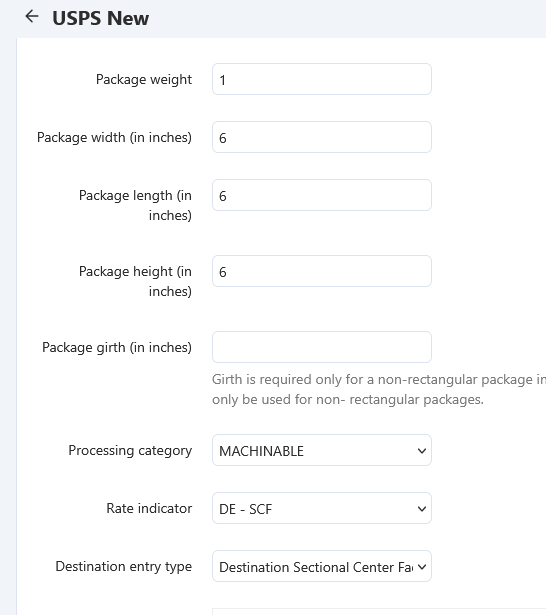
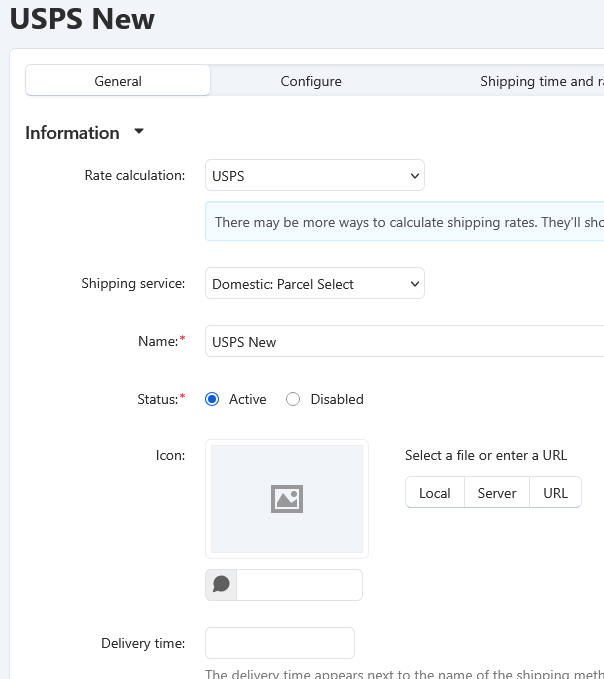
I am still working with CSC Support on USPS. The settings are very confusing. They provided the attached suggested settings and they work for Parcel Select but not Priority mail. So, I am still confused about this one. It’s the weekend so I am not putting much effort right now but will update if CSC or I figure something out.

I am guessing but


they may put put out a patch for both UPS and USPS integrations.

1 Like

These setting work for Domestic Priority Mail.

Price Type: Commercial
Processing Category: Machinable
Rate Indicator: SP - Single Piece
Destination entry Type: None

I still do not have International First Class or Priority figured out.

REVISED TO PROVIDE RESIDENTIAL NEGOTIATED RATES:
added this field - ‘ResidentialAddressIndicator’ => ‘’,
to the ship to section

app/Tygh/Shippings/Services/Ups.php

Make a backup of your original file before making the change.

This may not be the final version.

Replace this:
‘PickupType’ => [
‘Code’ => $pickup_type,
],
‘Shipment’ => [
‘Service’ => [
‘Code’ => $this->_shipping_info[‘service_code’],
],
‘Shipper’ => [
‘Address’ => [
‘PostalCode’ => $this->package[‘origination’][‘zipcode’],
‘CountryCode’ => $this->package[‘origination’][‘country’],
],
],
‘ShipTo’ => [
‘Address’ => [
‘StateProvinceCode’ => $this->package[‘location’][‘state’],
‘PostalCode’ => $this->package[‘location’][‘zipcode’],
‘CountryCode’
=> $this->package[‘location’][‘country’],
‘ResidentialAddress’ => ‘’,
],
],
‘ShipFrom’ => [
‘Address’ => [
‘StateProvinceCode’ => $this->package[‘origination’][‘state’],
‘PostalCode’ => $this->package[‘origination’][‘zipcode’],
‘CountryCode’ => $this->package[‘origination’][‘country’],
‘ResidentialAddress’ => ‘’,
]
]

with this:
‘PickupType’ => [
‘Code’ => $pickup_type,
],
‘CustomerClassification’ => [
‘Code’ => ‘00’,
],
‘Shipment’ => [
‘Service’ => [
‘Code’ => $this->_shipping_info[‘service_code’],
],
‘Shipper’ => [
‘Address’ => [
‘PostalCode’ => $this->package[‘origination’][‘zipcode’],
‘CountryCode’ => $this->package[‘origination’][‘country’],
‘City’ => $this->package[‘origination’][‘city’],
],
],
‘ShipTo’ => [
‘Address’ => [

‘StateProvinceCode’ => $this->package[‘location’][‘state’],
‘PostalCode’ => $this->package[‘location’][‘zipcode’],
‘CountryCode’ => $this->package[‘location’][‘country’],
‘City’ => $this->package[‘location’][‘city’],
‘ResidentialAddressIndicator’ => ‘’,
],
],
‘ShipFrom’ => [
‘Address’ => [
‘StateProvinceCode’ => $this->package[‘origination’][‘state’],
‘PostalCode’ => $this->package[‘origination’][‘zipcode’],
‘CountryCode’ => $this->package[‘origination’][‘country’],
‘City’ => $this->package[‘origination’][‘city’],
]
]

2 Likes

Perfect! USPS Domestic Priority Mail is now working with these settings.

Media Mail was working for a while, but now I am getting this error:

Error Exceeded quota limit. Please contact Email Us and a representative will assist. (Error code: 429) Too Many Requests. Quota limit exceeded. The number of requests has exceeded the quota established for the time period.

This issue is now affecting all rates on my site. I have temporarily gone back to the old way [deprecated] so my site can continue taking orders.

I have not put the new USPS into use. I don’t feel like the integration is correct. I have raised a ticket in CSC support for both UPS and USPS.

Support has closed my ticket for USPS. Not sure why but they did. I plan on reopening it.

I have also posted both in Bug Tracker.

I think we need more squeaky wheels. I don’t feel like the issues are getting the attention they need. Maybe they are working on it but it is not obvious to me. Both are really messed up and they are important!!

As far as USPS goes, that HAS to be working by January 25 or we’re all up the creek without a paddle. I did send the error message to USPS to see what they say, but haven’t heard back from them.

This is the ridiculous, useless, and non-serious reply I just received from USPS about this:

Thank you for contacting the USPS® Internet Customer Care Center. I apologize for the complications you are experiencing. After reading your email I suggest trying one or all of the following procedures because I have found that in most cases they will resolve the issue you are experiencing:

  1. Clear your browser’s cached memory and history.
  2. Enable Cookies for your browser.
  3. Ensure that your browser has the most recent version installed.
  4. If you are using Edge, please make sure you are using version 7.0 or higher.
  5. If you are using any firewall software, please disable while using our website services.
  6. Add the website to your list of trusted Internet sites.
2 Likes