avo-ken
November 23, 2025, 7:56pm
1
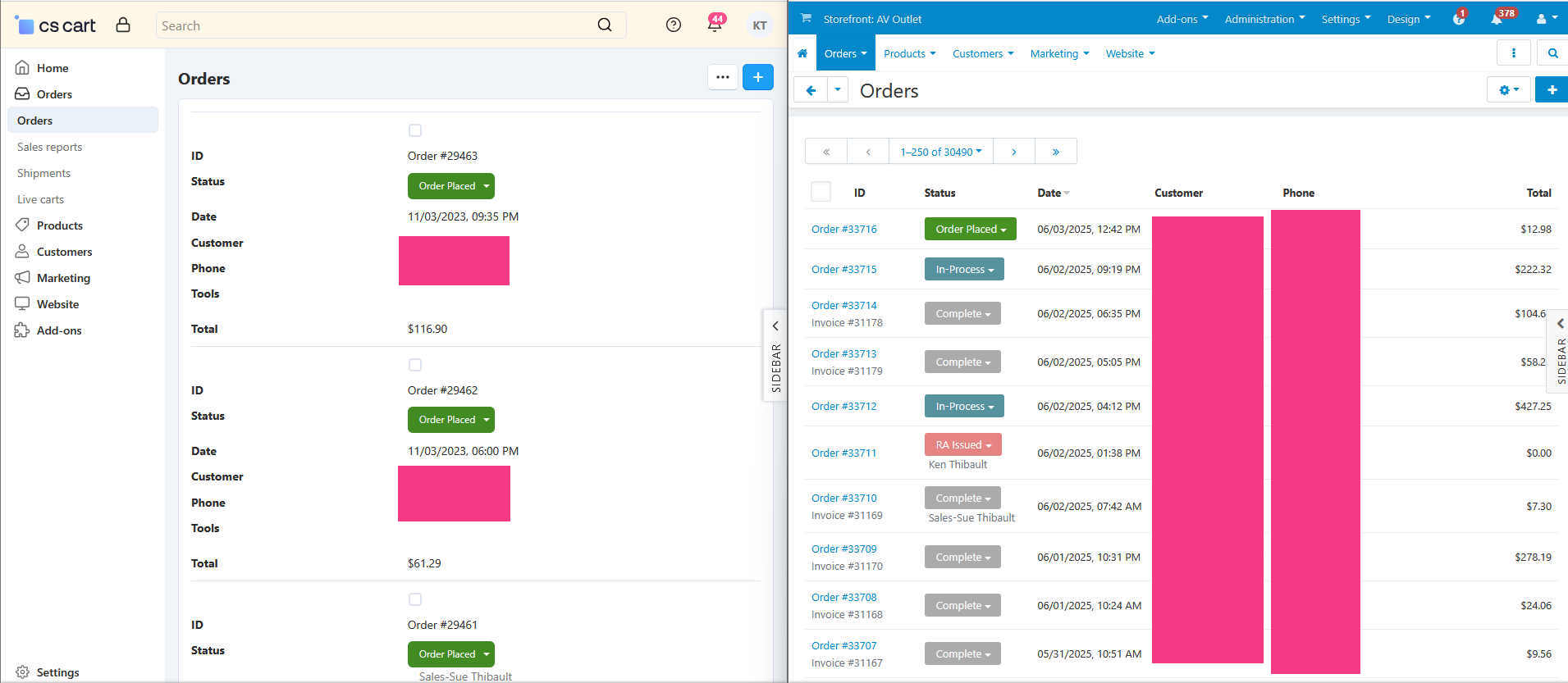
So…I can’t stand how bloated the view of Admin in split screen which is my primary view.
I have poked around and found: design/backend/css/tygh/responsive/responsive.less
This is part of the code. If I change max-width to something less like 700 I get the results that I want but I don’t want to modify the core file. I have tried copying the code into my backend my_changes file but it is not working.
/* Responsive tables */
@media (max-width: 1032px) {Can someone suggest a way to invoke this change via my_changes?
Thanks
Please give us more details what do you want to do?
avo-ken
November 24, 2025, 2:55pm
3
I am trying to get rid of the bloated view of the new style admin.
Yes, I know I can make my screen just a little bit wider but who wants to manually adjust the screen sizes all the time. I like them equal as well.
My image shows the current view on the left and the old view on the right. I just want to see more information on the screen without having to scroll.
Seems that adjusting the the responsive trigger fixes this at least in my initial playing around. I am certain other things will need to get fixed.
Thanks for the interest.
Ken
I think, it is required to change CSS related to the table-responsive class
You can extra styles with our instruction
Could you tell me hot to add custom css or js for admin panel? [:grin:]
Sorry, we missed your request. Let me make the post of Andrey Sidorov more readable
How To Add Custom Css With My Changes Addon To Admin Panel
The tutorial is actual for CS-Cart and Multi-Vendor 4.x
Make sure that the status of the My changes add-on is Active ( Add-ons → Manage Add-ons )
Create the design/backend/templates/addons/my_changes/hooks/index/styles.post.tpl file with the following content
{style src="ad…