1- I copied "design\themes\mytheme\templates\blocks\static_templates\logo.tpl" TO "design\themes\mytheme\templates\addons\my_changes\blocks\static_templates\mylogo.tpl"
2- I changed the first line in mylogo.top FROM
{** block-description:tmpl_logo **}
TO
{** block-description:tmpl_mylogo **}
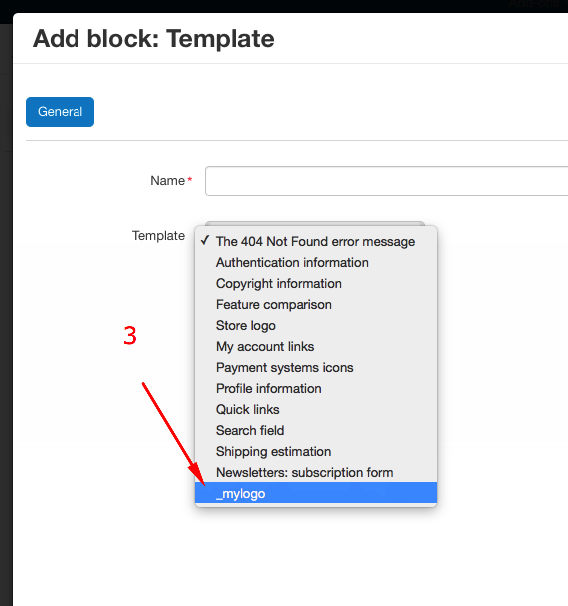
3- I made sure the my changes addon is active in the admin
means that this template will be named tmpl_logo an you should see 2 layout of "Logo" in the list ;) please remove that code and you should find the template named
_mylogo
and if you want to add a name to this template you just go to Language > Variables and add this value
Any help is welcomed!
How to add a custom block that is visible in a product tab for cs cart 4.19.1?
where to place the .tpl to be visible displayed in template selector (drop down) for creating new block?
I added prices_tab.tpl in
/home/mysite/dev.mydomain.ro/design/themes/responsive/templates/blocks/product_tabs and the tab is visible in backend but is not visible in front end.
I didn clear the cache no results.
Didn t get how to link a product tab with a block that doesn t have a template visible in selector or needs to be visible in selector?
The product tabs from addons are stored in the database. At first you should create the file for product tabs and install the module then. In this case it will be automatically added to the database. This applies to all addons
The path to the template should be saved in table “cscart_product_tabs”?
as example:
addons/my_custom_addon/blocks/product_tabs/my_custom_addon.tpl?
Do I need to Add Block → HTML block with Smarty and in the content to place path to
.tpl file
{include file=“addons/my_custom_addon/blocks/product_tabs/my_custom_addon.tpl”}?
This will make tab to be visible in product page?
There ia also a option to create the link between .tpl and block from addon not to create manually?