Dear Community Members,
We are excited to introduce our latest solution - The CS-Cart POS System! Managing your online and physical stores is now easier, faster, and more efficient.
This POS (Point-of-Sale) is a system that allows store owners to manage sales in both their physical and online stores at the same time. It keeps customers’ information and their orders for a better shopping experience. The admin can create multiple cashiers for the store to work with the POS. It is like a store’s control center, handling sales reports and even keeping track of staff and products. The seller can use the POS in the physical store to place an order. With its unique functionalities, users can get a better experience.
Some inner features of POS include discount, pausing carts with Hold Cart, generating receipts via email or QR code, and tracking sales with X-Reports and Z-Reports. The app syncs to update categories, orders, and products in real-time. It accepts various payments, handles miscellaneous charges, and also allows new product additions. Basically, it’s a simple and easy-to-use app that helps stores run smoothly and efficiently.
Features
-
Admin can change the appearance of the POS system using theme settings.
-
The POS admin panel allows users to change settings like access keys, logs, order status, payment methods, etc.
-
Admin can manage app versions and links for Android and iOS. This helps users find and download the latest versions from Google Play and the Apple App Store.
-
The admin decides what settings POS users can use. These settings include things like adding new products, showing extra charges, and turning on different languages.
-
The admin panel has POS user logs, which contain a detailed list of everything users do on the POS machine. It records things like sales, refunds, and any other actions.
-
Admin can view and manage a list of cashiers along with their information. They can also add new cashiers.
-
Vendor admin can customize its POS settings within the vendor panel as well. This includes setting receipt notes and images, payment details, email templates, and setting up POS tips.
-
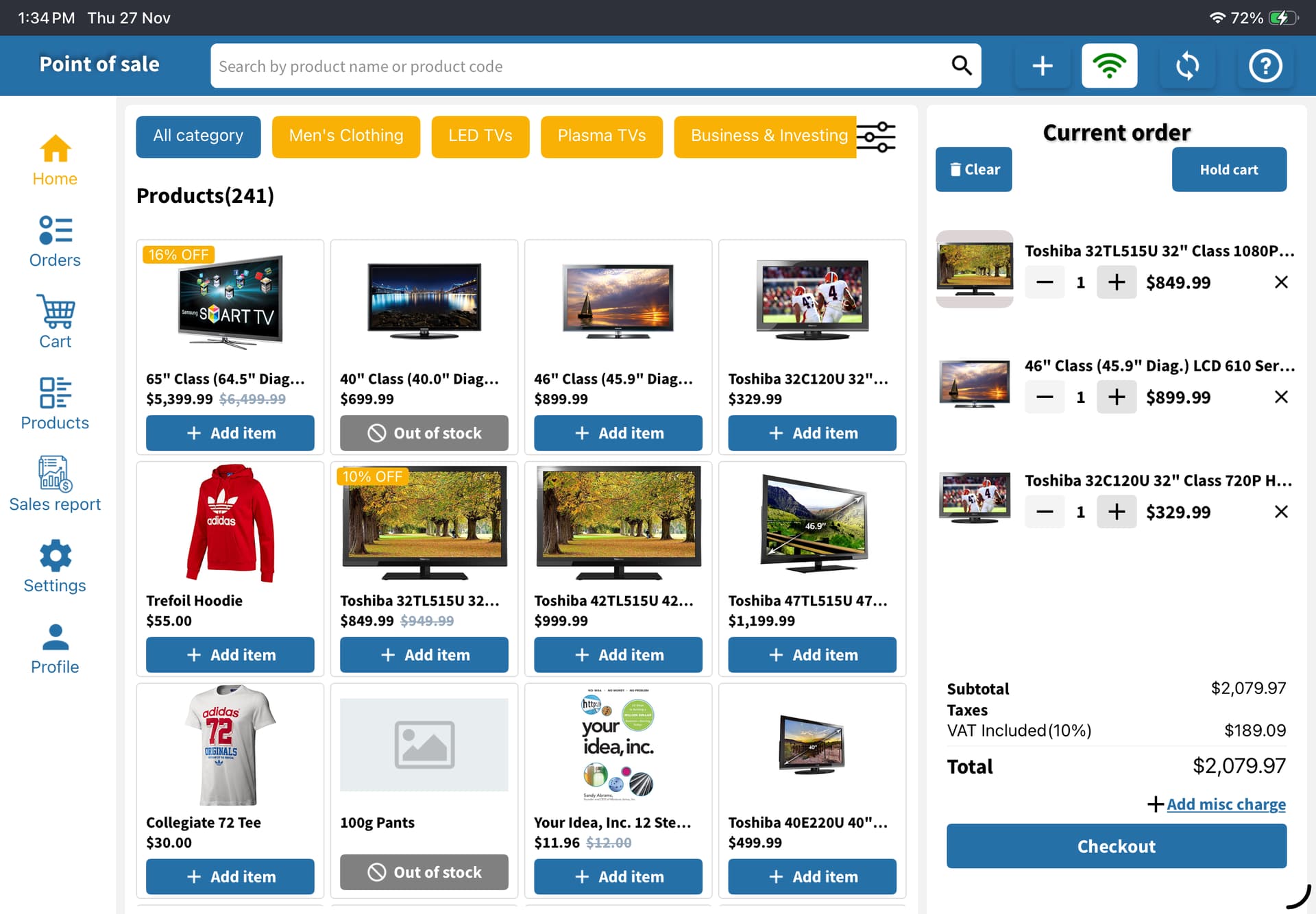
The POS system allows users to easily add items to the cart, handle quantities, and effortlessly complete payments for smooth and easy sales transactions.
-
This system allows sellers to easily set a discount for customers, enhancing flexibility in pricing.
-
Tip options allow customers to express appreciation for good service by adding a tip to their purchase.
-
This accepts payment through multiple methods, including split payment, pay with cash, pay with card, and bank transfer.
-
Quickly create and send detailed order receipts to customers through email, printing, or a QR code.
-
It has the feature of adding new products in the store.
-
The POS can work in both online as well as offline modes.
-
“Syncing” keeps everything updated with three options: categories, orders, and products.
-
The order menu shows details of POS orders, online orders, and returns. It helps you view order information and also process returns easily.
-
The Hold Cart feature allows sellers to pause carts. They can easily resume them later when needed.
-
The POS system allows you to quickly and easily search products.
-
The system tracks sales easily with X-Reports and Z-Reports. It helps sellers to look into their performance and handle cash drawers easily.
-
Users can easily change the languages and currency settings using the POS system.
-
The POS system allows users to use the camera to scan the barcode of the product.
For more details and to explore the POS System, click here: Read More
User Guide:
Learn more about POS System
Buy:
To buy this Application, please visit the Marketplace store
Compatibility:
CS-Cart, CS-Cart Multivendor,4.7.x, 4.8.x, 4.9.x,4.10.x,4.11.x,4.12.x,4.13.x,4.14.x,4.15.x,4.16.x,4.17.x**
Support:
This Application is developed and published by Ecarter Technologies Pvt. Ltd., a CS-Cart developer. You are guaranteed a quality application supported by future versions. If you need help, please contact us via email support@ecarter.co
Need modifications or any assistance? Please email at support@ecarter.co