Yes.
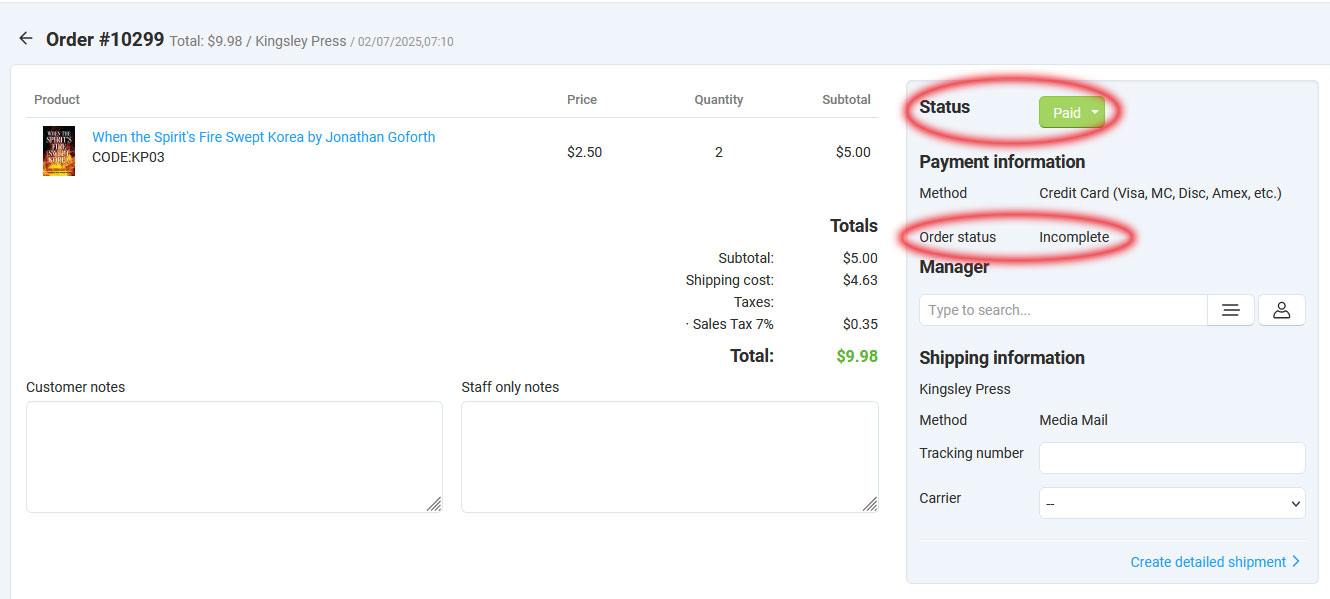
@cscartrocks has taken a look at this and removed more legacy Stripe folders and files, and that error is now gone. The only thing that is puzzling me now is why an order would show in the backend with a status of “incomplete” even though it’s showing as paid, and the funds have been successfully captured by Stripe.
Would anyone know why I am now getting two emails for each order placed? All I have changed is I have switched from PayPal Pro to Stripe for my credit card payments. The emails are identical. I can certainly delete one email each time I get an order, but it would be nice to know why I’m getting 2 and how to fix it.
There seems to be a bug in the Stripe implementation which causes it to not empty the cart after the order is submitted, and the customer thinks they need to submit the order again. This results in a duplicate order. Then the duplicate order has to be refunded. Seems like I saw somewhere this is a known bug. Will it be fixed in the next update of CS-Cart?
Been following this thread as it could come in handy when we continue to upgrade. I wish I could help further, but we are on 4.15.2 with Stripe 1.0 and it’s always been working fine. Hoping for a complete fix with no bugs, sorry again!